
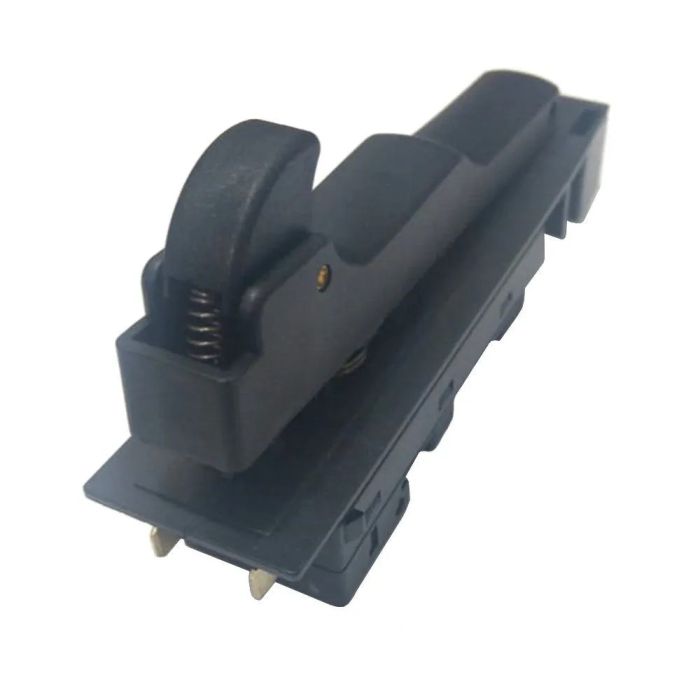
SWITCH GA70/9020 7"GRINDR
"650101-0 Switch 1267. 4102
Part Number: 650101-0
*This part replaces obsolete part #: 651176-2; 651177-0 and 651143-7.
This is a genuine part for Makita; not an aftermarket part.
Description:
This is a Push-Button type switch that has 4 terminals; 2 with screws already inserted. It also has a locking mechanism on the switch. This genuine Makita replacement part is sold individually.
Switches are commonly replaced parts in tools. A switch handles on/off and variable speed operations. They also have a role in electric breaking; they can momentarily reverse electrical polarity. Because switches use mechanical internals; they will degrade and wear out over time; eventually needing replacement. Some common signs of a broken or failing switch are as follows:
The tool has completely stopped functioning
it will not start.
The tool operates intermittently; requiring multiple tries to turn on; until eventually it wonÆt start at all.
The variable speed function and electric braking arenÆt working properly.
Compatibility
This part is compatible with the following machines:
Makita
9015B Grinder
9016B Grinder
9049 Grinder
9069 Angle Grinder
9067L Angle Grinder
9040L Angle Sander
9060L Angle Sander
9047L Angle Grinder
GA7021 Angle Grinder
GA7020 Angle Grinder
GA9020 Angle Grinder
GA5020 Angle Grinder Makita 9027L Grinder Makita GS5000 125mm (5"") Straight Grinder
á
Product Information
Manufacturer: Makita
Category Number: 650101-0
Classification: Part
Weight: 0.15 lbs."
Part Number: 650101-0
*This part replaces obsolete part #: 651176-2; 651177-0 and 651143-7.
This is a genuine part for Makita; not an aftermarket part.
Description:
This is a Push-Button type switch that has 4 terminals; 2 with screws already inserted. It also has a locking mechanism on the switch. This genuine Makita replacement part is sold individually.
Switches are commonly replaced parts in tools. A switch handles on/off and variable speed operations. They also have a role in electric breaking; they can momentarily reverse electrical polarity. Because switches use mechanical internals; they will degrade and wear out over time; eventually needing replacement. Some common signs of a broken or failing switch are as follows:
The tool has completely stopped functioning
it will not start.
The tool operates intermittently; requiring multiple tries to turn on; until eventually it wonÆt start at all.
The variable speed function and electric braking arenÆt working properly.
Compatibility
This part is compatible with the following machines:
Makita
9015B Grinder
9016B Grinder
9049 Grinder
9069 Angle Grinder
9067L Angle Grinder
9040L Angle Sander
9060L Angle Sander
9047L Angle Grinder
GA7021 Angle Grinder
GA7020 Angle Grinder
GA9020 Angle Grinder
GA5020 Angle Grinder Makita 9027L Grinder Makita GS5000 125mm (5"") Straight Grinder
á
Product Information
Manufacturer: Makita
Category Number: 650101-0
Classification: Part
Weight: 0.15 lbs."
In stock
Only 5 left
SKU
MAK-650101-0
TTD139.01






"650101-0 Switch 1267. 4102
Part Number: 650101-0
*This part replaces obsolete part #: 651176-2; 651177-0 and 651143-7.
This is a genuine part for Makita; not an aftermarket part.
Description:
This is a Push-Button
Part Number: 650101-0
*This part replaces obsolete part #: 651176-2; 651177-0 and 651143-7.
This is a genuine part for Makita; not an aftermarket part.
Description:
This is a Push-Button
| SKU | MAK-650101-0 |
|---|---|
| Weight | 0.000000 |
| Manufacturer | MAKITA |
Write Your Own Review
Payment Plan:
The items you need are well within your reach. ShopSSLTT has the premium products you want at affordable prices and with our shop now pay later payment plans we make them accessible to all. Lear more on the following links
Payment plan Details : You can now finance your purchases with flexible payment plans. Click here to learn how.
Requirements: Before you apply for the plan make sure you have all the required documents, click here to see the list of documents required.